Sending manual trades
How to send a manual trade from the Trading Dashboard through the same trade queue as webhook trades.
The manual trade form on the Trading page sends a trade through the same trade queue as webhook trades:
- Pick all connected accounts or selected target accounts from the dropdown.
- Choose direction (Buy / Sell) and enter the symbol.
- Enter Stop Loss, in pips or absolute price depending on the EA's SL/TP input mode.
- Choose Exit Mode: Take Profit uses the TP field, while Trailing Stop disables TP and sends the trade with trailing enabled.
- Submit. Manual trades use the account card's Risk%; there is no manual risk override field.
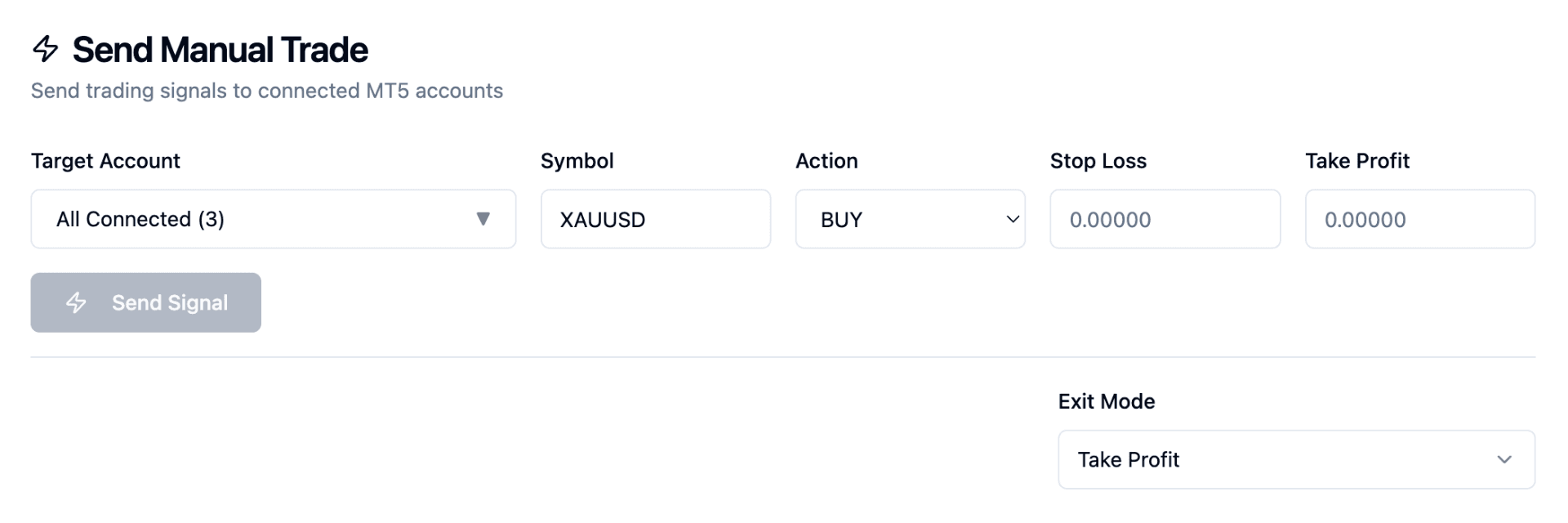
The Send Manual Trade form on the Trading page, for picking Target Account, Symbol, Action, SL/TP, and Exit Mode.
Choosing accounts
The dropdown lists connected accounts. Leaving it on "All Connected" sends to every one of them; selecting individually sends only to those.
The list does not filter on Auto Trade. An account with Auto Trade switched off still appears and still receives the trade, because that toggle gates webhook signals rather than manual ones.
Pips or price is decided by the EA
The form sends a bare number. Whether 20 means twenty pips or the price 20 is decided by the EA's SL/TP mode input in your terminal, not by the dashboard.
Check that input before sending your first manual trade on a new terminal. In pips mode a stop entered as an absolute price is an enormous distance, and in price mode a stop entered as pips is nonsensical.
For Modify actions the form spells out the convention: in pips mode a negative value moves the stop toward breakeven and a positive value widens it, and leaving the field blank keeps the current level.
Actions beyond buy and sell
The Action dropdown also carries the exit and adjustment commands: close longs, close shorts, close all, and modify SL/TP for all positions, longs only, or shorts only.
Close all disables the symbol field, because it is not symbol-specific. It closes every open position on the account, including trades you opened by hand in MT5. See external trades.
Close and modify actions bypass trading windows, so you can always flatten or adjust a position regardless of the hour.
Trading windows and blocked accounts
Opening trades respect Trading Windows, enforced server-side rather than in the browser.
If some of the selected accounts are outside their window, the trade is sent to the rest and the confirmation notes how many were blocked. If all of them are outside, nothing is sent and you get an "Outside Trading Window" message naming the accounts.
One difference from the webhook path worth knowing: accounts blocked on a manual trade get no row in the Trade Queue. The toast is the only record, so the queue shows a smaller number of entries than accounts you selected rather than explicit skips.
What is validated before sending
The form checks that a symbol is present, that buy and sell trades carry a non-zero stop loss, and that a modify carries at least one of SL or TP. There is no symbol whitelist and no range checking on the numbers you type; the server adds its own limits on symbol length, trail multiplier and risk.
Repeated identical submissions inside a ten-second window are treated as one trade, so a double-click or an impatient second press will not open two positions.
Setting Trading Inputs from the dashboard
How to set Max risk per trade, Max simultaneous trades, SL/TP mode, Block opposite, and Max daily drawdown from the Trading Inputs panel, and how Roll out to all accounts applies one account's settings everywhere.
Trade Queue: viewing recent signals
How to use the Trade Queue to view and audit recent signals sent to your MT5 accounts.