
Setting Trading Inputs from the dashboard
How to set Max risk per trade, Max simultaneous trades, SL/TP mode, Block opposite, and Max daily drawdown from the Trading Inputs panel, and how Roll out to all accounts applies one account's settings everywhere.
Every account card has a Trading Inputs button (the sliders icon, between the Online status pill and Edit). It opens a panel that controls how the EA trades on that account — risk caps, trade limits, stop-loss mode, and drawdown protection — without touching MT5.

The Trading Inputs button sits between Online status and Edit on the account card.
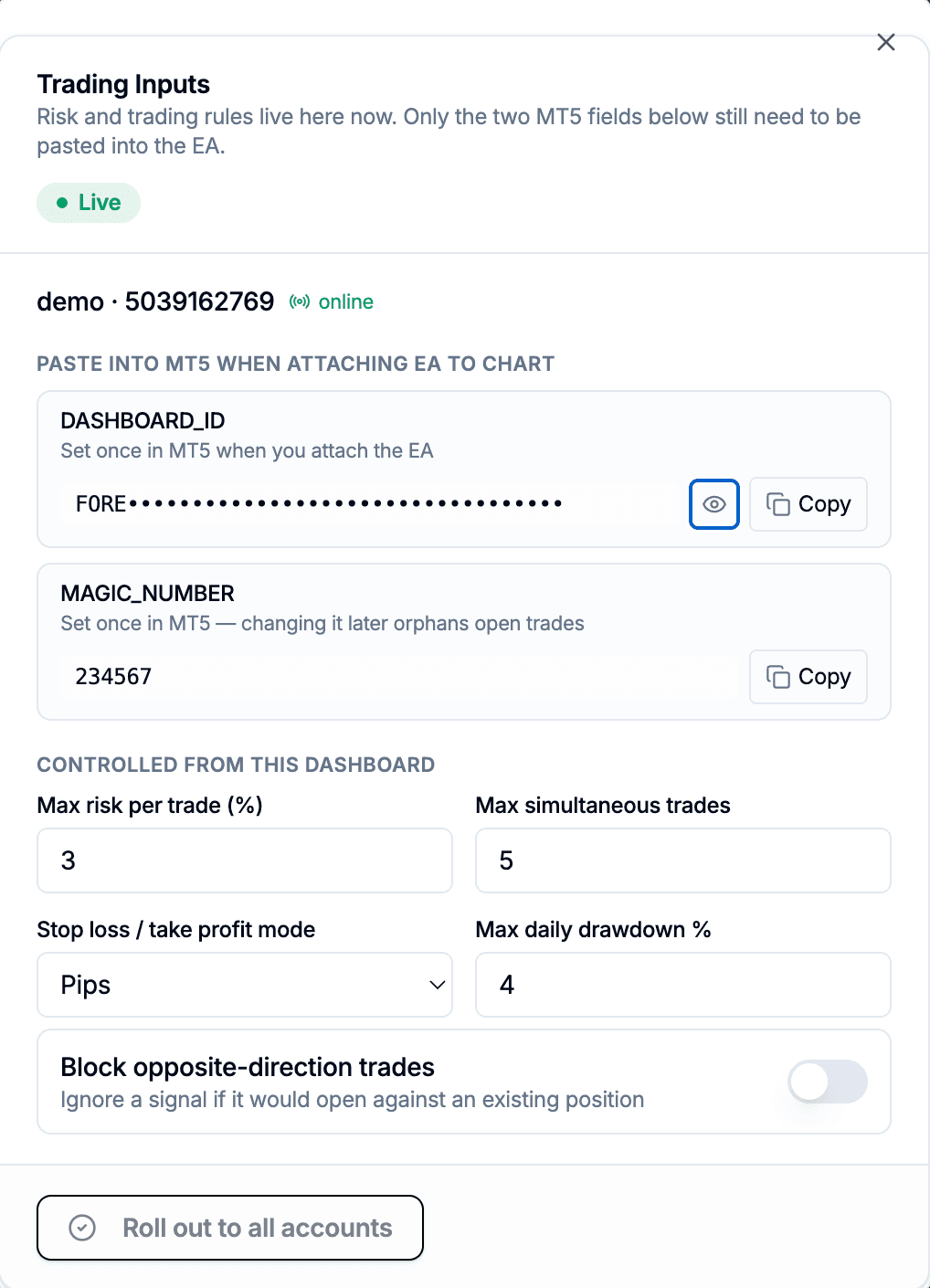
The Trading Inputs panel itself, opened from that button.
Change a value once, save, and the EA picks it up on its next poll (about a second later) — no reattaching, no MT5 Inputs dialog, no per-terminal drift between accounts that are supposed to share the same risk rules. The dashboard is the one place to manage them, for one account or all of them at once.
Two fields still go in MT5
DASHBOARD_ID and MAGIC_NUMBER are the only fields left as real MT5 inputs, shown at the top of the panel with a Copy button:
DASHBOARD_IDis the credential that links this EA instance to your dashboard account. Set it once when you attach the EA to a chart. It's masked by default; click the eye icon to reveal it before copying.MAGIC_NUMBERtags every trade the EA opens so it can find and manage those trades later. Changing it after the EA has open positions orphans them — the EA can no longer recognise, modify, or close trades opened under the old number, and they get treated as external/manual trades. Leave it as-is unless you specifically know why you're changing it.
Both stay local because they identify this specific EA instance to the backend, which has to happen before the EA can poll for anything else — there's nothing to fetch these two from yet at that point.
What's controlled from the dashboard
Everything else in the panel writes straight to your account settings and reaches the EA on its next poll:
| Field | What it does |
|---|---|
| Max risk per trade (%) | Caps the risk percentage used for a trade, even if a signal or override asks for more |
| Max simultaneous trades | Refuses a new trade once this many are already open on the account |
| Stop loss / take profit mode | Whether SL/TP values from a signal are read as pips or absolute price |
| Block opposite-direction trades | Ignores a signal that would open against an existing position |
| Max daily drawdown % | Blocks new buy/sell signals once the day's equity loss exceeds this, 0 disables it. See Daily drawdown protection for how the day-reset and balance-vs-equity comparison work. |
The badge in the panel's header tracks the field, not the account: Live means the saved values match what's shown, Unsaved changes means you've edited something and not saved yet, Saving while the write is in flight. Nothing auto-saves — you have to click Save changes.
Max risk per trade is not Risk % per trade
These are two different settings and it's easy to conflate them:
- Risk % per Trade lives in the account card's Edit dialog. It's the risk percentage actually used to size every trade. See Switching an account between Demo, Live and Challenge for that dialog.
- Max risk per trade lives in the Trading Inputs panel covered here. It's a ceiling — if a signal or an override asks for more risk than this, it gets capped down to this value. It doesn't set the risk used day to day; Risk % per Trade does that.
Think of Risk % per Trade as "what I normally risk" and Max risk per trade as "the most I'll ever allow, no matter what a signal says."
Roll out to all accounts
Click Roll out to all accounts and every other account you own gets the currently-shown values for the dashboard-controlled fields — max risk per trade, max simultaneous trades, SL/TP mode, block opposite, and max daily drawdown. It does not touch DASHBOARD_ID, MAGIC_NUMBER, or Risk % per Trade on those accounts, since those are meant to stay per-account.
This is the fast path for anyone running the same risk rules across several prop-firm or multi-account setups: configure one account the way you want it, roll it out, done. There's no partial rollout — it applies to every other account on your dashboard in one action.
Seeing what's active without opening the dashboard
The EA also prints the current dashboard-controlled values directly on the chart, below the connection status line, so you can check what's active without switching back to the browser. It's read-only there — editing still only happens in the dashboard panel.